|
MINOTAUR™ AUTOMOTIVE TUNING SYSTEM
|
|
EEC Tuner™ Compatibility
|
|
|
Downloading a calibration to the EEC Tuner
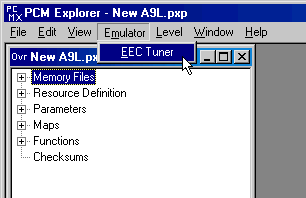
- Select the Overview window
- Select Emulator | EEC Tuner from the menu bar
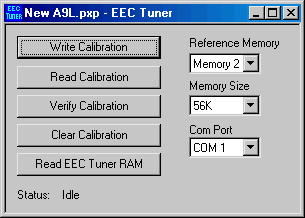
- Set the Reference Memory to the memory containing the stock program
- The stock program must match the EEC you are using exactly!
- Set the Com Port
- Click the 'Write Calibration' button
- Memory 1 and the selected Reference Memory will be compared and the difference sent to the EEC Tuner.
The error message 'Too many changes' may be caused by:
- Too many changes to the calibration - up to 2500 bytes can be stored in the EEC Tuner
- The working file (memory 1) is larger than the reference memory
- The working file (memory 1) and the reference memory are not for the same EEC
Uploading a calibration from the EEC Tuner
- Create a new project
- Load the stock memory file using File | Load Memory...
- Click the 'Read Calibration' button
- Wait for the read to complete
- Memory 1 has now been patched with the calibration changes stored in the EEC Tuner
- Save the memory file using File | Save Memory...
- Be sure to specify a new file name - don't overwrite the stock file
Reading the EEC stock program
- Create a new project - do not load a memory file
- Select Emulator | EEC Tuner from the menu bar
- Set the Memory Size - use 56K if you do not know the actual size
- Set the Com Port
- Turn ignition on - do not start engine
- Click 'Clear Calibration' button
- Click 'Read EEC Tuner RAM' button
- Wait for the read to complete
- Use File | Save Memory... to save the memory file
Next: Program Options
|
|
|
|